


Pathways.org Baby Milestones
4.771.00 Reviews
App Specs
- Version
- 2.20.0
- Updated On
- License
- Free
- Downloads
- 100,000+
- Developer
- Pathways.org
- Categories
- Parenting
- Platform
- Android, iOS
Screenshots

 Analysis by AppCompare
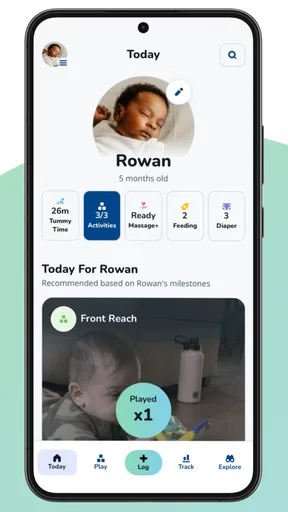
I find a baby-development app most useful when it gives me a calm routine, not another reason to compare one child with another. That is the lens I would bring to Pathways.org Baby Milestones: use it to learn what skills to notice and to make space for play, while treating a checklist as a guide rather than a verdict. Its focus on baby games and a Tummy Time tracker makes it more hands-on than a general parenting diary, which is helpful if you want ideas for what to do with your baby as well as a way to reflect on development.
A baseline routine that fits real days
I would start by setting aside a few quiet minutes to explore the developmental material, then choose one idea that fits the baby’s mood and the space available. A short play moment on the floor can be more realistic than trying to follow an elaborate schedule, especially on a day shaped by naps, feeds, and errands. The useful habit is to notice what the baby engages with and return to the app later, rather than interrupting play to record every small change.
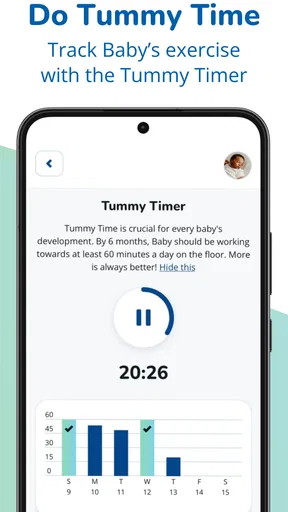
The Tummy Time tracker is most valuable as a prompt for consistency, not as a scorecard. If tummy time is already part of a daily routine, logging it can help a caregiver remember how often it happened; if the baby is tired or unsettled, I would not push through merely to complete an entry. The app can support a routine, but a parent’s observation of the baby’s comfort still matters more than a streak or a perfect record.
Settings and choices worth checking
Before relying on any developmental guidance, I’d make sure the app is being used for the right child and stage, and I’d take time to understand how its age-based material is organized. That simple check helps keep activities relevant and prevents a parent from treating content for a different point in development as a target for today. Pathways.org is a parenting app from Pathways.org, and its stated purpose is to help babies reach milestones through activities and tracking.
It is also worth deciding what you want to keep in the app. If you use notes or photos, a small, consistent record—such as an observation you want to discuss at a checkup—is likely to be more useful than trying to document the entire day. I would avoid adding sensitive details just because a field is available, and I’d check the app’s current settings and privacy information before storing anything personal. That is sensible for any digital baby journal, not a reason to treat the app as a medical record.
Faster patterns for busy caregivers
One practical approach is to pair the app with something you already do: look at an activity before floor play, then use the tracker afterward if it helps you remember the session. That keeps the phone from becoming the center of play. A second useful pattern is to share one specific observation with another caregiver—what the baby tried, what seemed enjoyable, or what you want to ask a clinician—rather than expecting everyone to maintain a detailed parallel log.
For a realistic example, imagine a caregiver has a few minutes after a feed while the baby is alert. They can choose a suitable play idea, put the phone aside, and pay attention to the baby’s response. Later, they can record a brief note if it will help them remember a new attempt or prepare a question for an appointment. This makes the app a prompt and memory aid, not a substitute for being present or for professional advice.
Worth Reading Before You Choose

EA SPORTS FC Mobile 26 Is a Bigger Football Game, but It Takes Time

Flipboard Shows What News Apps Must Do Beyond the Feed

Switching to Android Auto Means Rethinking Your Driving Routine

Google Calendar Makes a Crowded Week Easier to Manage

Ludo King Makes the Most of the Minutes Between Plans

Baby Panda World Brings Quick Play to Modern Phones, but Its Game Library Feels Busy
Where it fits—and where another option may be better
Compared with a plain milestone chart, Pathways.org is appealing if you want activities and a Tummy Time routine alongside developmental information. Compared with a broad parenting tracker, its narrower focus can make it easier to use when your main question is what kind of play to try or what skill to observe. On the other hand, parents who mainly want feeding, sleep, diaper, or appointment logs may prefer an app built around those daily records. A paper notebook can also be better for a household that wants a shared record without putting baby observations on a phone.
I would not use a milestone app to diagnose a delay or to decide that a baby is behind based on a single missed item. Babies develop at different rates, and a checklist cannot interpret the full picture. If something worries you, bring the observation to a pediatric professional rather than waiting for an app to settle the question. The app is best for learning and organizing what you notice; it is not a replacement for individualized assessment.
Who will get the most from it
I think it is a good fit for parents and caregivers who want approachable developmental guidance and simple activity ideas, particularly if they appreciate having a gentle reminder to make time for tummy time and play. It may also help a caregiver who wants to arrive at a checkup with a concise example instead of relying on memory. It is less compelling for someone who wants a comprehensive household organizer, a clinical development assessment, or a highly customized routine. In those cases, a dedicated daily-care tracker, a clinician’s guidance, or a simple shared notebook may serve the need better.
Pathways.org Baby Milestones is free, rated for Everyone, and has an average rating of 4.8 from around 800 ratings, with over 100,000 installs. It was released in July 2022, and version 2.19.0 requires Android 8.0 or later. Those details make it easy to consider without a purchase decision, but the more important question is whether its focused approach matches how you want to support your baby’s play and development.
Using the app with a steady hand
Ever wondered if your baby is hitting those crucial developmental milestones on time? Well, I’ve got something that might just be a game changer for you. Say hello to Pathways.org Baby Milestones. I gave this app a spin, and here's what I found.
What's the Buzz About?
Pathways.org Baby Milestones is like having a pocket-sized pediatrician, minus the co-pay. This app is designed to guide parents through the myriad of growth stages their little ones experience from birth to age three. It’s packed with expert-backed information and easy-to-follow resources that help you track your baby’s progress.
First Impressions
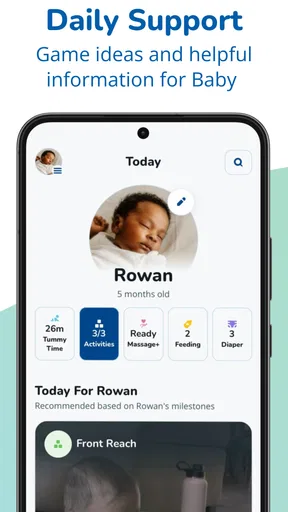
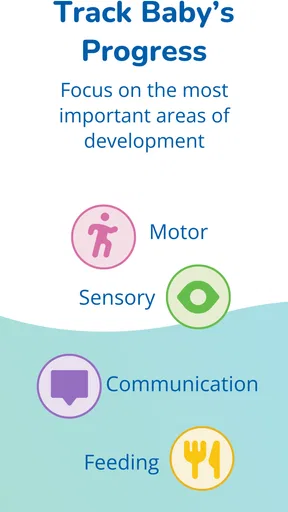
Right off the bat, the app greets you with a clean, friendly interface. Navigating through it is a breeze, which is a relief when you've got a squirmy baby in one arm and a phone in the other. The main dashboard offers a comprehensive overview of developmental categories like motor skills, communication, and cognitive growth.
Features You'll Love
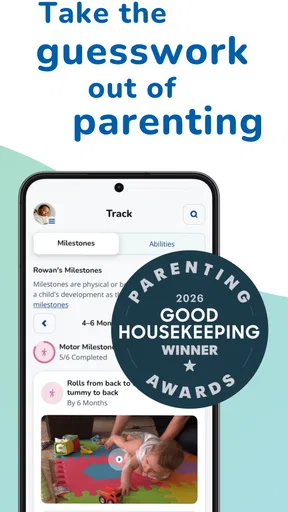
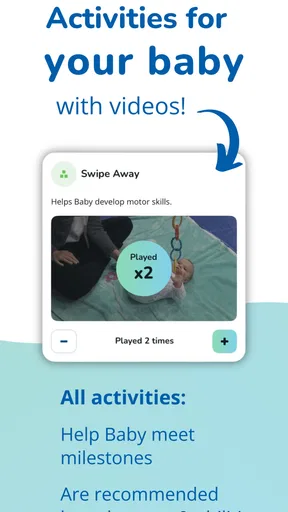
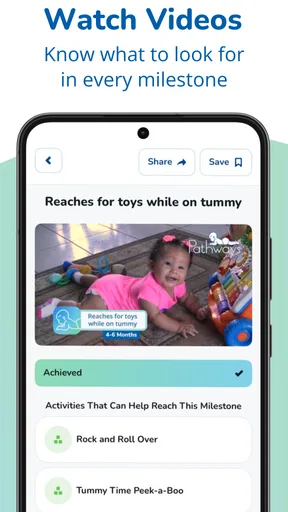
Now, let’s talk features. The app shines with its detailed milestone checklists. It’s like having a roadmap for your baby’s journey. There’s also a nifty section with educational videos and tips, which I found incredibly helpful. These resources are backed by pediatric experts, ensuring you're getting reliable advice.
Another standout feature is the ability to track and document your baby’s milestones. You can jot down notes and even upload photos. It’s a great way to keep a digital baby book, capturing those precious firsts.
How It Helps
This app isn’t just about ticking boxes. It provides reassurance. You can monitor your baby’s development and spot any potential delays early on. The app encourages you to celebrate your baby’s achievements, making the whole parenting gig feel a bit more manageable.
Community and Support
One feature I found particularly heartwarming is the community aspect. There's an option to connect with other parents and share experiences. Sometimes, a bit of shared wisdom from another parent is just what you need when you're in the trenches of parenting.
The app also offers links to professional services if you suspect your baby might need extra help. It’s reassuring to know that expert advice is just a few taps away.
The Final Word
In the sea of parenting apps, Pathways.org Baby Milestones stands out as a reliable co-pilot. It’s not just about tracking milestones; it’s about empowering parents with knowledge and confidence. Whether you're a first-timer or a seasoned parent, this app is a worthy addition to your parenting toolkit.
So go ahead, download it, and enjoy the ride. Watching your baby grow is a journey, and with this app, it feels like you’ve got a trusted friend along the way.
Pros
- Comprehensive milestone tracking for parents.
- User-friendly interface with clear visuals.
- Offers expert advice and resources.
- Customizable notifications for reminders.
- Supports multiple child profiles.
Cons
- Limited offline functionality.
- Some features require account creation.
- Less interactive than similar apps.
- Occasional glitches in progress tracking.
- Limited language options available.
FAQs for Pathways.org Baby Milestones
What is the main purpose of the Pathways.org Baby Milestones app?
The Pathways.org Baby Milestones app is designed to help parents track their child's developmental progress from birth to age 3. It offers milestone checklists, tips, and resources to ensure your baby is meeting expected developmental stages. The app also provides guidance on when to seek professional advice if concerns arise.
How user-friendly is the Pathways.org Baby Milestones app for parents?
The app is highly user-friendly, featuring an intuitive interface that makes it easy for parents to navigate through milestone checklists and educational resources. Each section is clearly labeled, and the app provides detailed instructions on how to track and support your baby's development effectively.
Are there any costs associated with using the Pathways.org Baby Milestones app?
The Pathways.org Baby Milestones app is free to download and use. It provides a wealth of information and resources at no cost, making it accessible for all parents who want to monitor and support their child's developmental journey without financial burden.
Does the app require an internet connection to function?
While some features of the Pathways.org Baby Milestones app, such as downloading updates or accessing online resources, may require an internet connection, the core functionality, such as viewing milestone checklists and tracking your child's progress, can be accessed offline once the app is downloaded.
What kind of support does the Pathways.org Baby Milestones app offer if I have concerns about my child's development?
The app provides comprehensive support, including detailed milestone checklists, signs to watch for potential developmental delays, and guidance on when to consult healthcare professionals. It also offers links to resources and expert advice, ensuring that parents can make informed decisions regarding their child's developmental needs.


